
Solid black rounded bar spanning the full width of the page (header element).

Unified Platform for People Development

Everything Your Development Work Needs in One Place
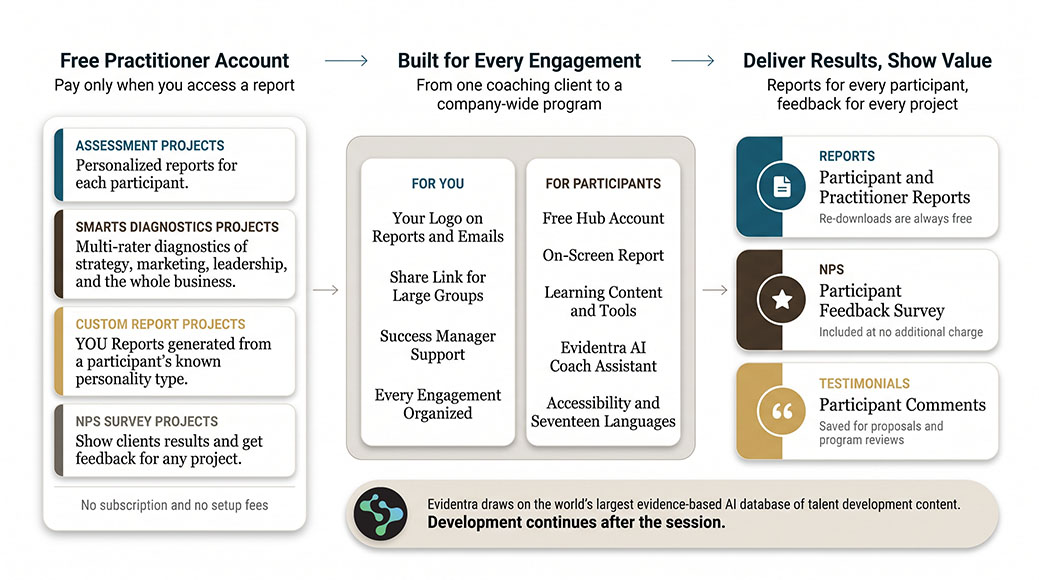
No annual fees, expert-designed assessments, access to an AI coach assistant for your participants, and experience surveys that gather participant feedback on every engagement.
Core Factors Pro Account

Make Development Sustainable

Everything You Need from First Invitation to Final Feedback

Gold badge icon with a dark cog/gear at its center, suggesting a settings or achievement symbol.
Your Pro Account is free.
Credits stay in your account until you use them. You can send an assessment to 100 people and pay only for the reports you access. Use a share link in your marketing to promote your services.
Icon button in a rounded square (likely a menu/settings/navigation icon)
A Free Hub Account for Every Participant
Hub accounts provide access to results for participants and a place to explore and apply their learning. Each participant can try Evidentra® free for 30 days.
Circular orange logo featuring a black, stylized Q in the center.
Research-Based Assessments You Can Rely On
Core Factors assessments were developed by experts in their field and built on decades of research.
Cloud download icon
Tools That Fit How You Already Work
If you already work with personality type, emotional intelligence, or four-style models, Core Factors assessments use frameworks you know.
Pause button (media control)
Flexible Distribution
Personalized email invitations for structured engagements. A consignment link for workshops and large groups, so a program can be sold before the roster exists.
Icon of a document or file with a folded corner in orange, used as a UI element
Reports Built for Your Sessions and Workshops.
Comprehensive reports designed for your sessions or workshops. Customized with your logo. Practitioner reports include full numeric data for each participant.
Save (floppy disk icon) button
Report Participant Feedback to Your Client
Use experience surveys, at no additional charge, to request feedback from participants after the engagement using the Net Promoter System.
Orange question mark inside a dark square, suggesting help or a placeholder icon.
Dedicated Support
A 30-minute onboarding call and a dedicated Success Manager available by email or Zoom whenever you need one. Integrated help desk for ongoing support. Real-time notifications when participants complete assessments.

How credits work

You Pay Only When You Access a Report

You purchase inventory credits when you need them. A credit is used only when you access results. You control if and when results are released to a participant’s Hub account. An assessment a participant leaves unfinished costs nothing. That makes share links practical for marketing and for large programs where participant details are unknown in advance.

$0

Subscription Fee

The Pro Account is free to apply for and free to maintain. No subscription fees, setup costs, or annual charges.

1 credit = 1 report

When a Credit Is Used

A credit is used only when you access a participant’s completed results. Sending an invitation costs nothing.

Never

Credit Expiration

Inventory credits stay in your account until you use them. Report re-downloads are always free.

Also included

Participant experience surveys and NPS data at the project level, a 30-minute onboarding call and a Success Manager available by email or Zoom whenever needed, an integrated help desk, and real-time notifications when participants complete assessments.

Building on the work

Show Your Clients the Value of Your Work

Clients who fund development want to hear how their people experienced the work. Experience surveys let you answer that question with participant data at the end of any engagement.

Send a survey from inside any project. Each participant answers one question on a zero to ten scale and can add a comment. The project reports your Net Promoter Score, your response rate, and every comment, and you can save the comments you want to quote.

Share the score and the comments in your client review. The client sees how participants rated the work, and you keep a set of participant comments for your next proposal. Surveys are included at no additional charge.
Core Factors Pro Account

Get started

Three Steps to Start Using the Pro Account

1

Apply for a Free Pro Account

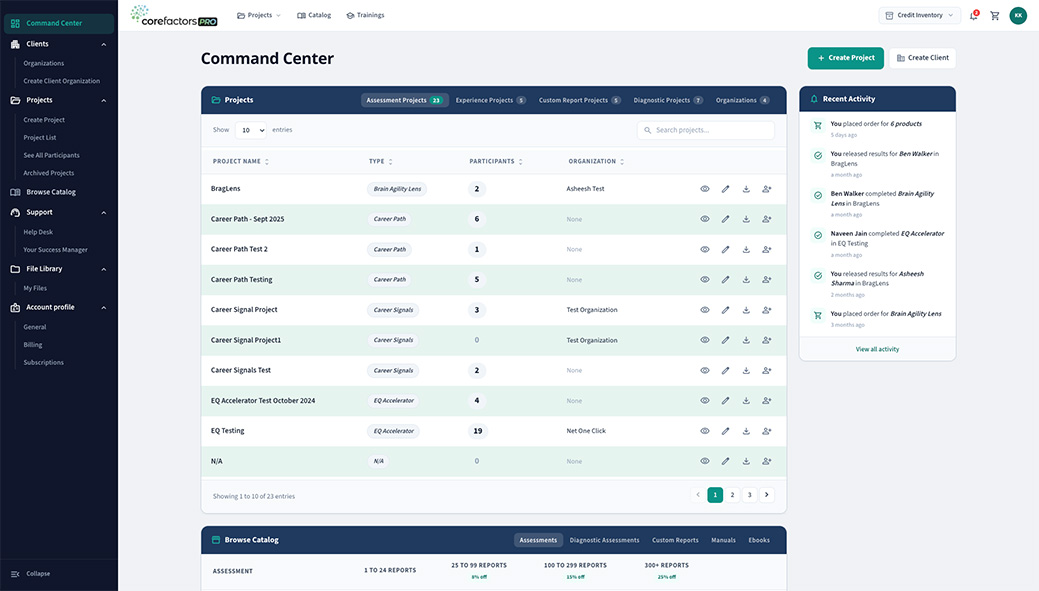
The application is free and takes a few minutes. Once approved, you have access to the full practitioner platform, including project-based administration, the assessment catalog, and your file manager.

2

Schedule Your Onboarding Call

Once approved, you schedule a 30-minute call with your dedicated success manager to walk through the platform, answer your questions, and get your first project set up.

3

Complete Accreditation Requirements

Most assessments require completion of a practitioner training program before they are activated in your account. Some assessments, like Career Signals, are available immediately. Your success manager will walk you through what applies to the assessments you plan to use.

Questions practitioners ask

Frequently Asked Questions

The Pro Account is free to apply for and free to maintain. There are no subscription fees, setup costs, or annual charges. You purchase inventory credits as needed, and a credit is only used when you access a participant’s completed results. Credits never expire.
You are not charged. A credit is only used when you access the participant’s completed results. Incomplete assessments cost you nothing.
Most assessments require completion of a practitioner training program before they are activated in your account. Some, like Career Signals, are available immediately with no training required. Your Success Manager will walk you through the requirements for the assessments you plan to use.
Yes. The Pro Account gives you access to assessments across type, emotional intelligence, career, and social dynamics. You can create multiple projects for the same client and use any combination of assessments across engagements.
When you release results, participants receive access to a Participant Hub where they read their full report on screen, write in My Journal, and work with Evidentra®, the always-on AI Coach Assistant, available as a 30-day trial once they activate it. You control when results are released.
Yes. You decide when results are released to participants. You can release results immediately after completion or hold them until you are ready to deliver. You control how and when participants first see their results.
Every Pro Account includes a dedicated Success Manager available by email or Zoom whenever you need one, an integrated help desk, and real-time email notifications when participants complete assessments. Report re-downloads are always free.

Ready when you are

Apply Today. The Account Is Free.

Apply for a free Pro Account, or request a demo and see the platform before you put it in front of a client.
  • null
    Free to apply
  • null
    Success Manager by email or Zoom whenever needed
  • null
    Feedback and NPS reporting at no extra charge