Decorative black rounded rectangle used as a separator (no informative content).

Personal Development Account for Every Participant

Development Continues After the Session
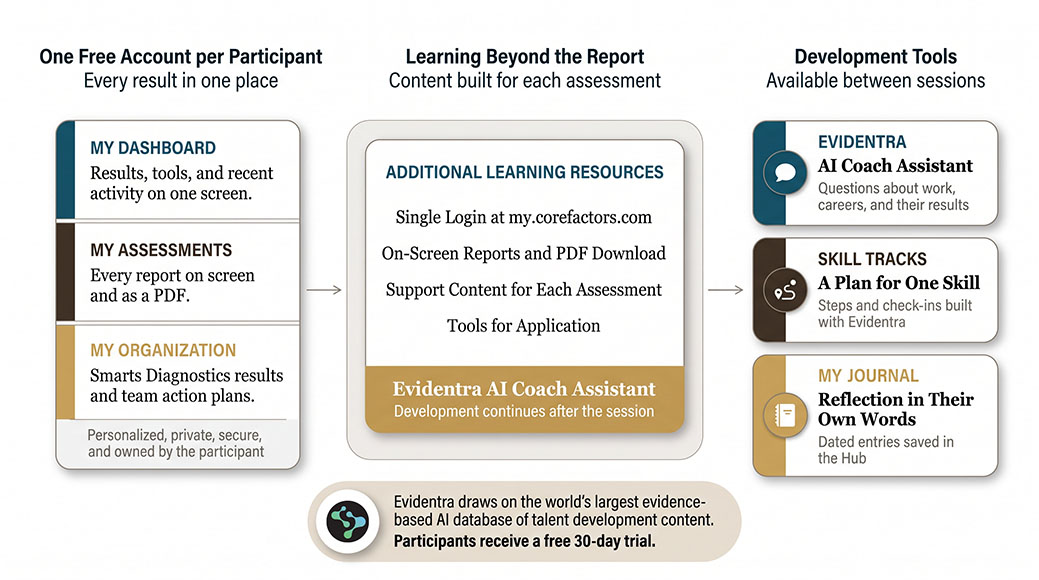
Every participant receives a free, private Hub account with on-screen results, a PDF report, and tools to apply what they learned. Evidentra®, the AI Coach Assistant, draws on the world’s largest evidence-based AI database of talent development content, and every participant starts with a free 30-day trial.

Deliver value beyond the session

Everything Your Participants Need to Keep Developing

Icon of a document with a folded corner and a bookmark ribbon, indicating a report or note.
A Free Account Each Participant Owns
Each participant receives a personal, private, and secure account to access results and work on their development.
Icon button in a rounded square (likely a menu/settings/navigation icon)
Full Results on Screen
Participants access their complete assessment report online. The PDF report downloads in one click. Results stay accessible whenever they need them.
Rounded black square button with a small yellow corner; icon unclear — provide context to choose a precise function (e.g., Menu, Settings, Help).
Evidentra® AI Coach Assistant
Your participants can ask Evidentra® about their results, their work, and the situations they face between your sessions. Conversations stay private to the participant.
Help icon: orange circular button with a white question mark for support or guidance
Skill Tracks
Personalized and targeted skill development tool, powered by Evidentra®. Progress stays visible and participants are prompted to complete the next steps. Skill Tracks is included with every Evidentra® subscription.
Pause button
Structured reflection
My Journal gives participants a place to write down goals and what they notice as they apply their results. Their dated entries show their progress over time.
Unable to determine image content; please provide context or a higher-resolution image.
Assessment-Specific Tools
Each assessment brings its own tools and content into the Hub. Modules built for each instrument extend the learning beyond the report.
Small brown circular icon with a darker spot on the top-left, simple and minimal in design (decorative/branding element).
Multilingual Support
The Participant Hub supports 17 languages, making the experience accessible for international engagements without the practitioner building accommodations.
I can’t determine the image content from this small icon. Please provide a higher-resolution image or describe its context to generate accurate ALT text.
Accessibility
An integrated accessibility widget provides adjustable text, contrast settings, and navigation tools for an inclusive participant experience.

Inside the Hub

One Account for Every Person in the Engagement

The Hub account is where development continues after the session. Participants keep their account after the engagement ends and can return to their results whenever they need them.

$0

Free Account for Every Participant

Every participant receives a free account to review their results, explore the learning content for each assessment, and apply what they learned.

Evidentra®

AI Coach Assistant

Evidentra® draws on the world’s largest evidence-based AI database of talent development content. Every participant starts with a free 30-day trial.

My Journal

Structured Reflection

A tool for goal-setting, observations, and action planning. Participants work through what their results mean for real situations between sessions.

Practitioner control

You decide when results are released to your participant.

Creating real change

The Session Is the Beginning of the Journey

Lasting change comes from development that continues after the session. Your participants make that progress when their results, their learning content, and their tools are in one place they can return to.

The Participant Hub is that place. Each participant owns a private, secure account with their results, Evidentra®, Skill Tracks, and My Journal, and you decide when their results arrive.

Get started

Three Steps to Start Delivering Through the Participant Hub

1

Apply for a Free Pro Account

The Participant Hub is part of the Core Factors platform. Participants access it automatically when you release their results from your Pro Account.

2

Administer Your First Assessment

Create a project, invite participants, and complete your first assessment administration. When participants finish, their results are ready for release.

3

Release Results

When you release results, participants receive access to their Participant Hub. The experience is live from that moment, and the development work continues between your sessions.

Questions practitioners ask

Frequently Asked Questions

Participants are prompted to set up their Participant Hub when you release their results. An email walks them through setup.
No. You control when results are released. Participants do not see their results until you choose to release them.
Evidentra® is the AI Coach Assistant. Participants can activate a 30-day trial from their Hub account. After the trial, access is $199 per participant per year, paid for by you at any time or by the participant.
The Participant Hub supports 17 languages. Participants select their preferred language when accessing their account.
Yes. When you purchase an inventory credit and access a participant’s results, the Participant Hub experience is included. There is no separate charge for participant access to on-screen results, My Journal, or content modules.
Yes. The Participant Hub stays open after the engagement ends. Participants return to their results when a relevant situation arises, and your work reaches past the original engagement.

Ready when you are

Give The Work Somewhere To Continue

Apply for a free Pro Account, or request a demo and see the Participant Hub from the participant’s side before you put it in front of a client.
  • null
    Included with every result you release
  • null
    17 languages
  • null
    Evidentra® included